> For the complete documentation index, see [llms.txt](https://docs.nullmask.io/llms.txt). Markdown versions of documentation pages are available by appending `.md` to page URLs; this page is available as [Markdown](https://docs.nullmask.io/protocol-specification/notes.md).
# Notes (Encrypted UTXOs)
Nullmask uses a UTXO model for the shielded account state. Each UTXO is called a **note** — an encrypted container holding value, token type, and owner information.
## Note Structure
{% hint style="success" %}
**Definition 4: Note**
A Nullmask *Note* is a tuple $$(\mathtt{rk\_hash}, \mathtt{value}, \mathtt{coin\_id}, \mathtt{rk\_trapdoor}, \mathtt{value\_trapdoor}, \mathtt{nfs\_hash})$$ where:
* $$\mathtt{rk\_hash}$$: hash of the Receiving Key that owns the note
* $$\mathtt{value}$$: note value (token amount)
* $$\mathtt{coin\_id}$$: token address (zero address for native ETH)
* $$\mathtt{rk\_trapdoor}$$: masking factor of note owner
* $$\mathtt{value\_trapdoor}$$: masking factor of note value
* $$\mathtt{nfs\_hash}$$: hash of all nullifiers from the shielded action that created this note
{% endhint %}
### The Role of nfs\_hash
For notes created via deposits, `nfs_hash` is set to a unique deposit index. For notes created by shielded actions, it is the Poseidon2 hash of all 6 input note nullifiers. Including this hash serves three purposes:
1. **Uniqueness** — Guarantees note commitment and nullifier uniqueness; prevents faerie gold attacks
2. **Recursion** — Enables recursive proving: a shielded action proof can verify proofs of the actions that funded it
3. **Compliance** — Enables Private Proof of Innocence and other compliance mechanisms
## Note Commitment
{% hint style="info" %}
**Algorithm 4: Note Commitment**
**Input:** A note $$(\mathtt{rk\_hash}, \mathtt{value}, \mathtt{coin\_id}, \mathtt{rk\_trapdoor}, \mathtt{value\_trapdoor}, \mathtt{nfs\_hash})$$
**Output:** Note commitment $$\mathtt{cm}$$
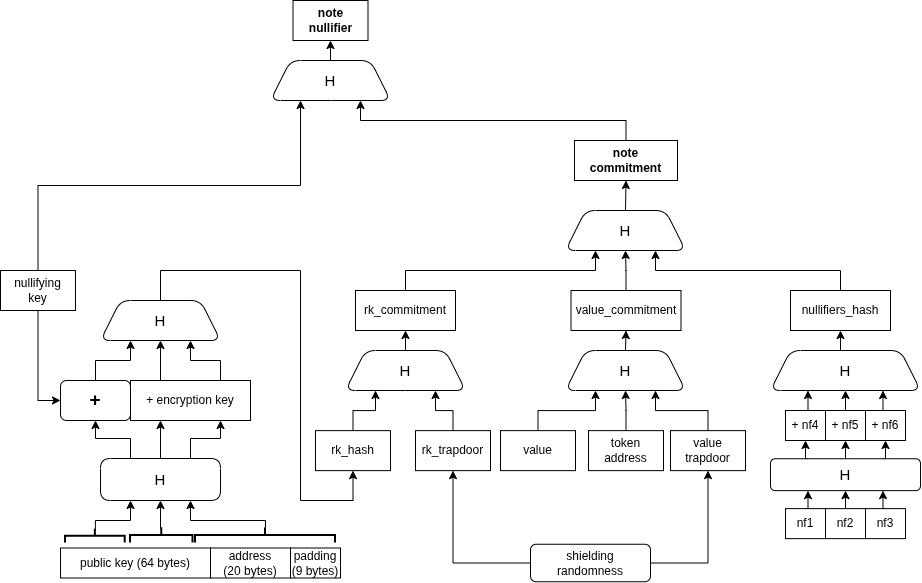
1. $$\mathtt{rk\_commitment} \gets \operatorname{Poseidon2T4}(\mathtt{rk\_hash}, \mathtt{rk\_trapdoor})$$
2. $$\mathtt{value\_commitment} \gets \operatorname{Poseidon2T4}(\mathtt{value}, \mathtt{coin\_id}, \mathtt{value\_trapdoor})$$
3. Return $$\operatorname{Poseidon2T4}(\mathtt{rk\_commitment}, \mathtt{value\_commitment}, \mathtt{nfs\_hash})$$
{% endhint %}
The commitment is a single field element that is stored in the on-chain Merkle tree. It hides the note's contents while enabling verification of note ownership and value in ZK proofs.
## Note Nullifier
{% hint style="success" %}
**Definition 5: Note Nullifier**
For a note with commitment $$\mathtt{cm}$$ belonging to a Viewing Key whose nullifying key is $$\mathtt{nk}$$, the *note nullifier* is:
$$\mathtt{nf} := \operatorname{Poseidon2T4}(\mathtt{cm}, \mathtt{nk})$$
{% endhint %}
When a note is spent, its nullifier is published on-chain. The contract maintains a set of all spent nullifiers and rejects any transaction that attempts to spend a note whose nullifier has already been recorded. This prevents double-spending without revealing which note was spent.
## Spendable Notes
A spendable note extends the basic note with Merkle tree context:
```rust
SpendableNote {
note: NotePlaintext, // The 5 plaintext fields
index: u32, // Position in Merkle tree
merkle_path: [Field; 16], // Siblings to the root
nullifiers_hash: Field, // From the action that created it
}
```
To spend a note in a ZK proof, the circuit:
1. Computes the note commitment from the plaintext fields
2. Verifies the Merkle path from the commitment to the tree root
3. Computes the note nullifier from the commitment and nullifying key
4. Asserts the note owner matches the sender's receiving key hash
5. Asserts the sender's `pnk` equals `Poseidon2(nk)` (proves ownership of nullifying key)
## Unified 6-Note Funding
All shielded actions take an array of 6 `SpendableNote` inputs. Notes are categorized by their `coin_id`:
* Notes matching the **action asset** contribute to the action value pool
* Notes matching the **fee asset** contribute to the fee value pool
* If action asset equals fee asset, both pools are combined
Unused slots are filled with **dummy notes** (all fields zero). Dummy notes produce a nullifier of 0, which the contract skips during nullifier recording.
### Nullifiers Hash
All 6 nullifiers (including zeros from dummies) are hashed together:
$$\mathtt{nullifiers\_hash} = \operatorname{Poseidon2T4}(\mathtt{nf}\_1, \mathtt{nf}\_2, \mathtt{nf}\_3, \mathtt{nf}\_4, \mathtt{nf}\_5, \mathtt{nf}\_6)$$
This hash is included in all output note commitments, binding them to the specific set of input notes that funded them.
## Commitment and Nullifier Diagram
Note nullifier and commitment derivation. H denotes the Poseidon2T4 hash function.
---
# Agent Instructions
This documentation is published with GitBook. GitBook is the documentation platform designed so that both humans and AI agents can read, navigate, and reason over technical content effectively. Learn more at gitbook.com.
## Querying This Documentation
If you need additional information that is not directly available in this page, you can query the documentation dynamically by asking a question.
Perform an HTTP GET request on the current page URL with the `ask` query parameter, and the optional `goal` query parameter:
```
GET https://docs.nullmask.io/protocol-specification/notes.md?ask=&goal=
```
`ask` is the immediate question: it should be specific, self-contained, and written in natural language.
`goal` is optional and describes the broader end goal you are ultimately trying to accomplish on behalf of the user. GitBook uses it to tailor the answer towards what is most useful for that goal.
The response will contain a direct answer to the question and relevant excerpts and sources from the documentation.
Use this mechanism when the answer is not explicitly present in the current page, you need clarification or additional context, or you want to retrieve related documentation sections.